Remove Comments Online
Tool Introduction
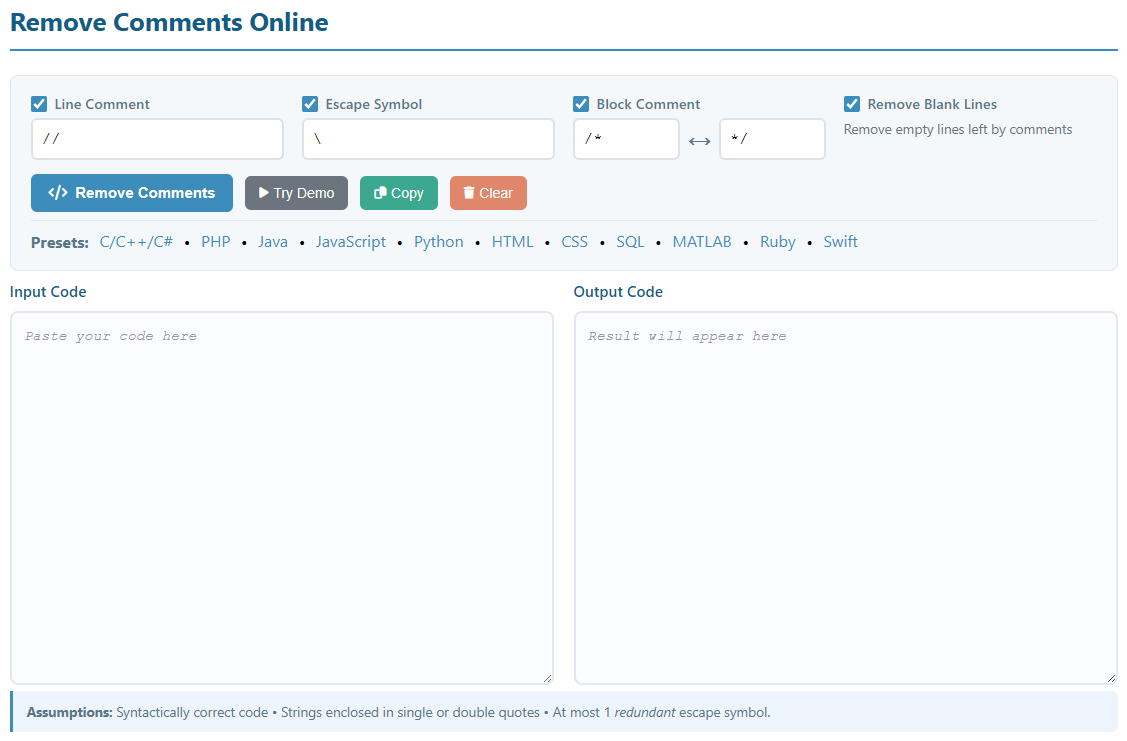
The Remove Comments Online tool is a powerful, general-purpose utility designed to automatically remove comments from source code in almost any programming or markup language. Whether you're working with C++, JavaScript, Python, HTML, CSS, Java, PHP, Ruby, SQL, MATLAB, or Swift, this tool intelligently identifies and removes both line comments and block comments while preserving the integrity of your code.
Our advanced parsing algorithm understands string literals, escape sequences, and different comment syntaxes, ensuring that comments within strings are not accidentally removed. This makes it perfect for cleaning up code before minification, preparing code for production, or simply creating cleaner code samples for documentation.
Key Features:
- Support for 10+ programming languages with preset configurations
- Handles both single-line and multi-line (block) comments
- Respects string literals and escape sequences
- Custom comment syntax configuration for any language
- Instant processing with no server upload required
- 100% client-side processing for privacy and security
How to Use
Using the Comment Remover tool is simple and straightforward. Follow these steps to clean your code:
- Select a Language Preset (Optional): Click on one of the preset language links (C/C++/C#, PHP, Java, JavaScript, Python, HTML, CSS, SQL, MATLAB, Ruby, or Swift) to automatically configure the comment syntax for that language.
- Configure Comment Syntax (If Needed):
- Line Comment: Enable and specify the character(s) that denote a single-line comment (e.g.,
//for JavaScript,#for Python) - Escape Symbol: Enable and specify the escape character used in strings (typically
\) - Block Comment: Enable and specify the opening and closing characters for multi-line comments (e.g.,
/*and*/for C-style languages)
- Line Comment: Enable and specify the character(s) that denote a single-line comment (e.g.,
- Paste Your Code: Copy and paste your source code into the large text area.
- Remove Comments: Click the "Remove Comments" button to process your code.
- Get Results: The tool will instantly replace your code with a cleaned version that has all comments removed.
Pro Tips:
- Uncheck any comment type you don't want to remove
- For custom or less common languages, manually configure the comment syntax
- The tool preserves your code's formatting and structure
- Always keep a backup of your original code before processing
Common Use Cases
Code Minification & Optimization
Remove comments before minifying JavaScript, CSS, or other code to reduce file size and improve loading times for production applications. This is essential for web performance optimization.
Creating Clean Code Examples
Prepare code snippets for documentation, tutorials, or presentations by removing developer comments that may be distracting or irrelevant to learners. Get clean, focused code samples.
Code Obfuscation
As a first step in code obfuscation, remove all comments and documentation to make it harder for others to understand your proprietary algorithms or business logic.
Code Analysis & Metrics
Calculate accurate lines of code (LOC) metrics by removing comments. This helps in project estimation, complexity analysis, and understanding the true size of your codebase.
Code Migration & Conversion
When converting code between languages or frameworks, remove old comments that may no longer be relevant or accurate in the new context. Start fresh with new documentation.
Code Cleanup
Remove outdated, redundant, or misleading comments from legacy code. This is particularly useful when refactoring old projects or cleaning up inherited codebases.
Educational Purposes
Teachers can provide students with commented code for learning, then provide the same code without comments for testing comprehension and code reading skills.
Code Comparison
Remove comments before comparing different versions of code to focus on actual code changes rather than comment modifications. This makes diff comparisons more meaningful.
Note: While removing comments can be useful for specific purposes, always maintain well-commented source code in your development environment. Comments are crucial for code maintainability and team collaboration.